The Focus Moment
A sand hourglass timer for your next focus block
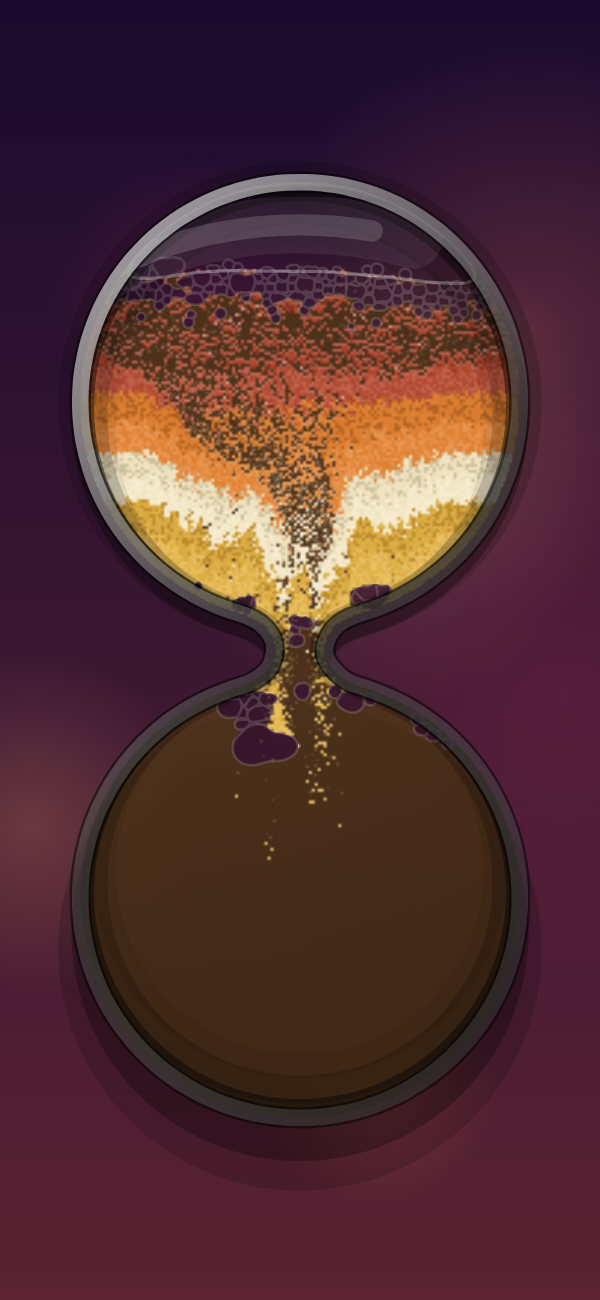
Dunarium's Focus Moment is a sand hourglass timer. Pick any span from 30 seconds to 12 hours in 30-second steps, tap a recent duration, and the sand runs down to a soft chime. Tilt, stir, and pour it while you sit. It's the falling-sand toy with a timer wrapped around it.
Last updated
What is the Focus Moment in Dunarium?
Focus is one of Dunarium's Moments, a preset way to use the sand. It's a sand hourglass: you pick a length, the sand starts falling, and it runs down until the time is up.
- Set anything from 30 seconds to 12 hours, in 30-second steps.
- Your recent durations sit in a recents list, so a 25-minute block is one tap next time.
- While the timer runs, the sand stays live. Tilt the phone and real gravity pours it, stir it with a finger, or shake to churn a new landscape.
- When the timer ends, a soft chime plays instead of a jarring alarm.
That's the whole feature. Dunarium is a falling-sand toy first, and Focus is that toy with a timer built in.
How do you set the timer?
You set the length with a recents list plus an hours : minutes : seconds picker. No presets to memorize, no account to sync.
- Range: 30 seconds up to 12 hours.
- Steps: 30 seconds at a time.
- Recents: your last-used durations are saved, so common blocks (5, 15, 25 minutes) are one tap.
- The same picker runs the Sleep Moment, which fades light and sound out instead of chiming.
You choose a length and watch the sand fall through it.
How is this different from a Pomodoro app?
The difference is large. The Pomodoro Technique, created by Francesco Cirillo in the late 1980s and named after his tomato-shaped kitchen timer (Wikipedia), is a real productivity method: 25 minutes of work, a 5-minute break, repeat. Apps built around it are good at that job.
If your goal is to get more done, a dedicated focus app is the better tool. Forest grows a virtual tree while you work (and funds real trees planted through its nonprofit partner), can block distracting apps, and keeps tags, streaks, and history. Others like Be Focused and Focus To-Do bolt a timer onto full task lists. Those are productivity systems. Dunarium is a sand toy with a timer built in.
| Dunarium Focus | Pomodoro / focus apps | |
|---|---|---|
| What it is | A sand toy with a timer | A productivity system with a timer |
| Duration | 30s–12h, 30-second steps | Usually a fixed 25/5 work-break cycle |
| Task lists & stats | None | Yes: tags, streaks, history |
| Blocks other apps | No | Often (e.g. Forest's Deep Focus) |
| The waiting itself | Tilt, stir, and pour live sand; ASMR sound | A screen countdown (or a growing tree) |
| Cost | Free; optional $4.99 one-time unlock | Free tiers and paid upgrades vary |
A pomodoro app helps you work. Dunarium makes the waiting feel less like staring at a countdown. Use both if you like: keep your pomodoro app for the streaks and stats, and open Dunarium when you want somewhere calmer to rest your eyes and hands between blocks.
Why sand instead of a screen countdown?
A phone timer usually means a shrinking number and a harsh sound at the end. The Focus Moment swaps that for something physical.
- The sand is a real-time gravity simulation: the phone's actual tilt pours thousands of grains through gel and rising air bubbles, and nothing is prerecorded.
- Your hands get something to do: pour and stir the sand with a finger, shake to churn a fresh landscape, or freeze gravity to hold a shape.
- A procedural ASMR soundscape (ticks, bloops, churns) is generated live as the sand moves, with a per-voice mixer and gentle, adjustable grain haptics.
- It ends on a soft chime.
The sand won't make the time pass faster, but it makes sitting with the timer feel calmer.
Is it a fidget replacement for focus?
Sort of, in the everyday sense. Some people like keeping something in their hands while they think: a pen, a fidget toy, a moving sand art frame on the desk. Focus puts that on the phone you already carry, with gentle grain haptics, sand you can stir and tilt, and a timer counting down underneath it.
Dunarium makes no claim to treat attention, anxiety, or anything clinical; Focus is a calmer way to sit with a timer, and that's all. If focus is a real struggle for you, that's worth raising with a professional.
What does it cost, and does it track me?
Focus is free to play, with no subscription and no account.
- No ads. Nothing interrupts the timer.
- Works offline after install.
- On-device. Your camera frames and sensor readings stay on your phone.
- Unlock Everything is an optional one-time $4.99 purchase (planned US price) that opens all 30 sand palettes, 28 glass shapes, and 49 backdrops. The Focus timer itself doesn't need it.
Dunarium is available on iPhone and Android.
Common questions
- What's the longest timer I can set?
- Up to 12 hours, in 30-second steps, from a 30-second minimum. Your common lengths are saved in a recents list for one-tap reuse.
- Does the Focus Moment work offline?
- Yes. After you install Dunarium it works offline, with no account and no ads. Your sensor readings and camera frames stay on the device.
- Is Dunarium a good Pomodoro app?
- No. It has no task lists, stats, or app-blocking; it's a sand toy with a timer. For streaks and tracking, a dedicated app like Forest is the better fit.
- What sound does the timer make when it ends?
- When the time is up, you hear a soft chime instead of a harsh alarm. While it runs, a live ASMR soundscape of ticks, bloops, and churns plays as the sand moves.
- How much does the Focus timer cost?
- It's free to play, with no subscription. An optional one-time $4.99 Unlock Everything opens all 30 palettes, 28 glass shapes, and 49 backdrops, and the Focus timer works without it.
- Can it replace a fidget toy?
- In an everyday way, it gives your hands sand to stir, pour, and tilt while a timer runs. It's a toy for your hands, and it makes no claim to be a medical or therapeutic device.
- Is a sand timer good for studying?
- Many people run the Focus hourglass over a study block or a stretch of deep work. The falling sand gives your eyes a calm place to rest between paragraphs, and a glance at it costs you seconds of concentration instead of the minutes a feed takes. The timer ends with one soft chime, so it never becomes its own distraction.
Get Dunarium on iPhone or Android
Download it free from the App Store or Google Play. No ads, no account, and it works offline.